
Event occurrences are scheduled instances of a given master event. Event occurrences of a master event share the same form but can have different times and capacities.
- Navigate to the Master Events domain.
- Click the Form view tab.
- Perform a Find for the master event you wish to schedule an event occurrence for.
- Click the Schedule tab.
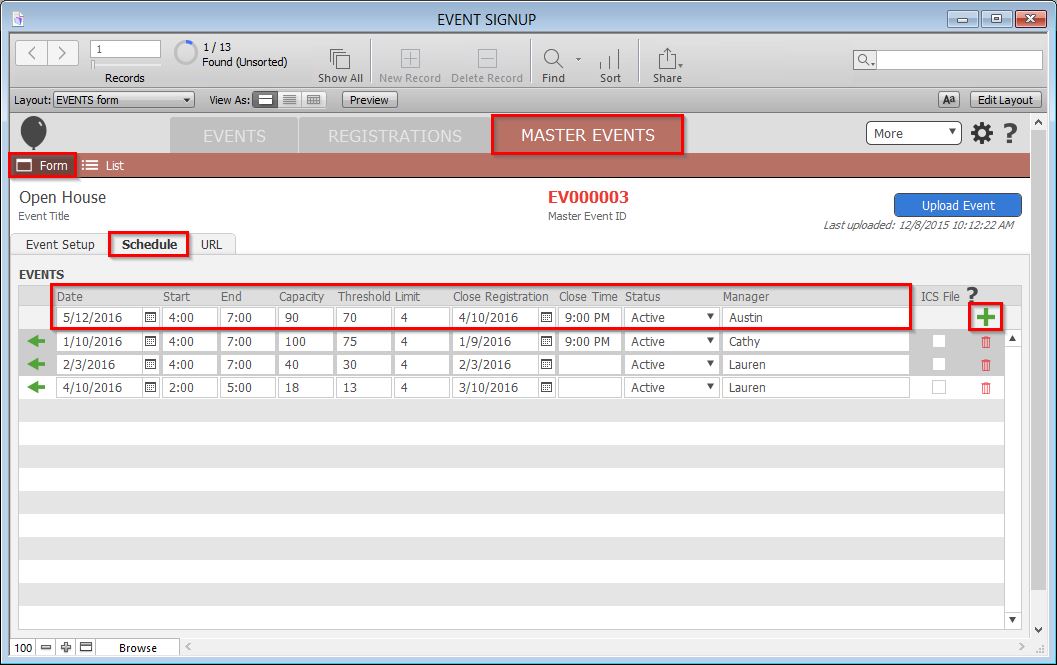
- Enter the event information in the provided empty fields at the top of the Events list.Note: The Capacity is the maximum number of attendees. The Threshold is the number of attendees at which a near capacity message will appear for new registrants. The Limit is the maximum number of attendees for each registration.
- Click the green + button to the right of the information you have just added.
- Click the blue Upload Event button to commit your changes.
