
An ICS file sends an invitation to add the event to the registrants online calendar. You may choose to include an ICS file for each occurrence of the master event.
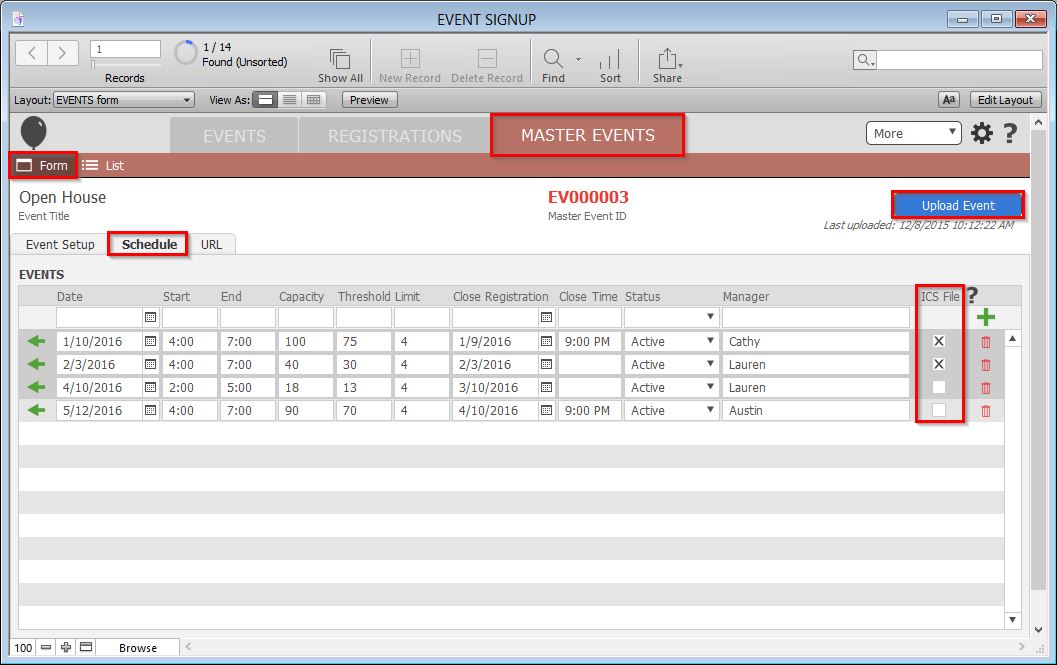
- Navigate to the Master Events domain.
- Click the Form view tab.
- Perform a Find for the event you wish to modify.
- Click the Schedule tab.
- Click the checkbox in the ICS File column for each event occurrence you wish to add an ICS file to.
 Note: ICS files must be enabled in Preferences to add them to event occurrences. See the Editing General Preferences section of this documentation for more information.
 - Click the blue Upload Form button to commit your changes.
