
To set the default phone number formatting for importing into PORTAL, you will navigate to PWS: Sources.
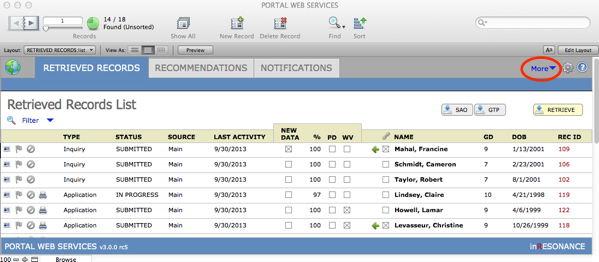
- Within PWS, click More > Sources.
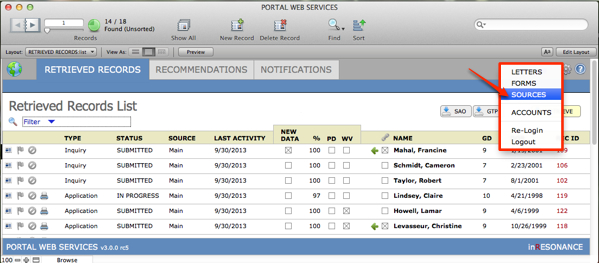
- If you accept applications via Gateway to Prep (GTP) or Standard Application Online (SAO), you will see this screen. Use the green arrow to navigate into PWS: Sources Main.
- In PWS Sources: Main, click the Settings subtab.
- In the General Prefs area, find the Phone format setting and use hash marks to define the formats to which you want phone numbers to conform.NOTE: It is possible that a family will enter a phone number in such a way that it will not format as you expect.
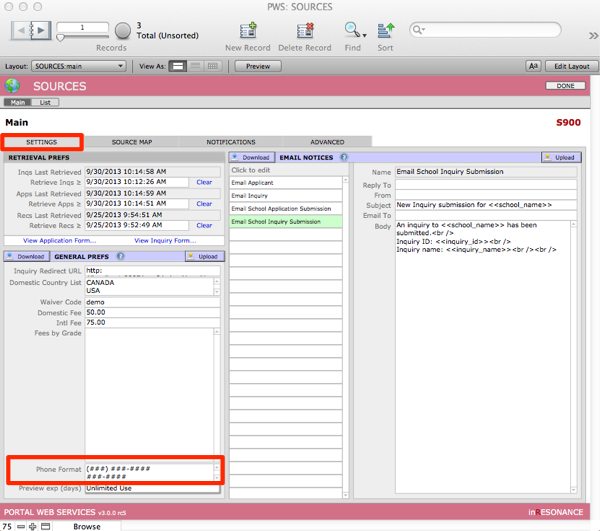
- Click out of the field to save.
- Click Upload to apply your changes to the web site.

