
Master events function as a template for a specific event type, such as an open house. Individual occurrences of these events may be scheduled once the master event is created.
- Navigate to the Master Events domain.
- Click the Form view tab.
- Under the Event Setup tab, click the + New Event button. It does not matter which event you are viewing when creating a new Master Event.
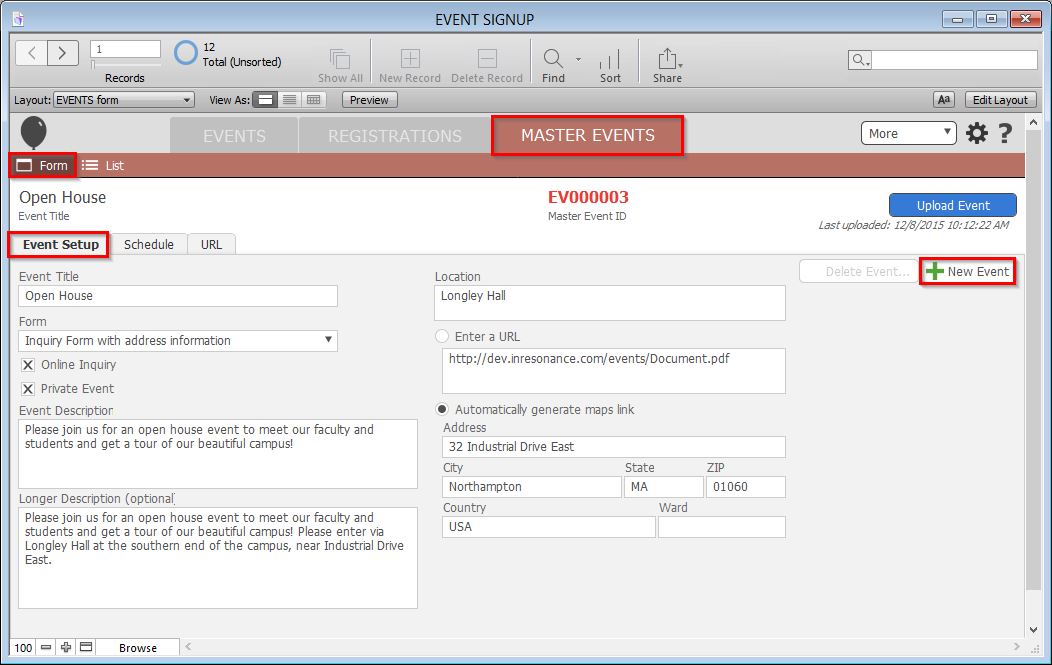
- Enter the Event Title.
- Choose a form from the Form drop-down list. The Online Inquiry checkbox will automatically fill if the chosen form is an Online Inquiry Form.
- If the event is to be private, check the Private Event checkbox.
- Enter an Event Description.
- Enter a Location.
- Enter a URL or enter the Address.
- Click the blue Upload Event button to commit your changes.
