
A Location is the name of the venue or event space, such as a room number or a building name. You may add a URL linking to directions or a map if one exists on your website already. Otherwise, entering the Address can generate a Google Maps link automatically.
- Navigate to the Master Events domain.
- Click the Form view tab.
- Perform a Find for the event you wish to modify.
- Click the Event Setup tab.
- Enter a Location.
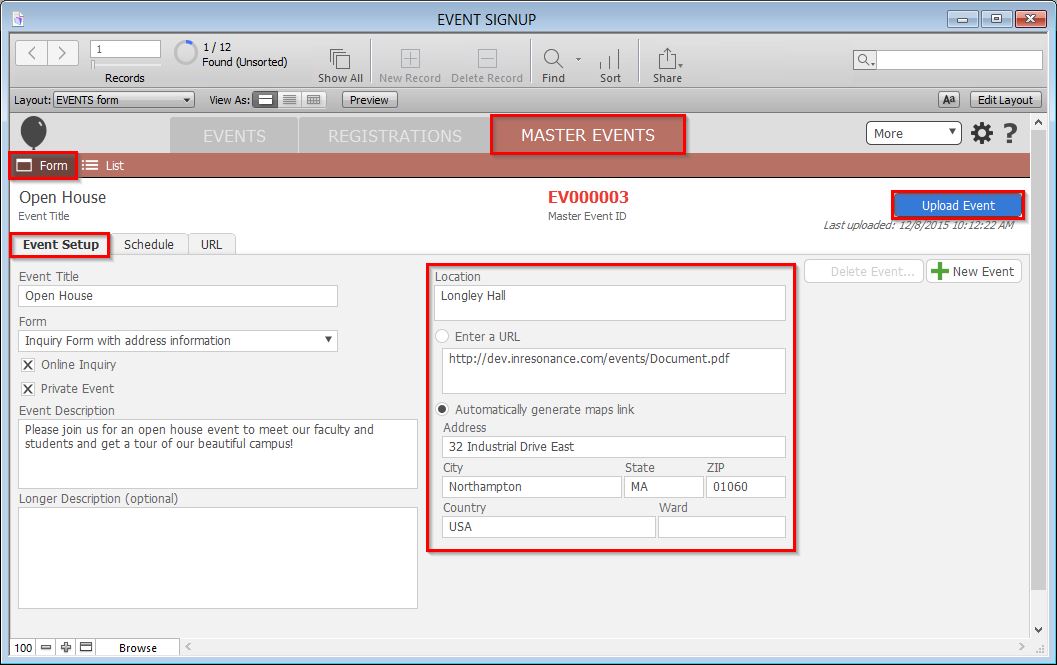
- Below the Location, either:
- Click the Enter a URL radial button if you wish to link to a page on your school’s website. Enter the URL in the space provided.
- Click the Automatically generate maps link if you wish to have a Google Maps link created for you. Enter the Address in the spaces provided.
- Click the blue Upload Event button.
