
The contents of FileMaker menus changes depending upon the file you are in. Scripts are productivity shortcuts for commonly needed actions.
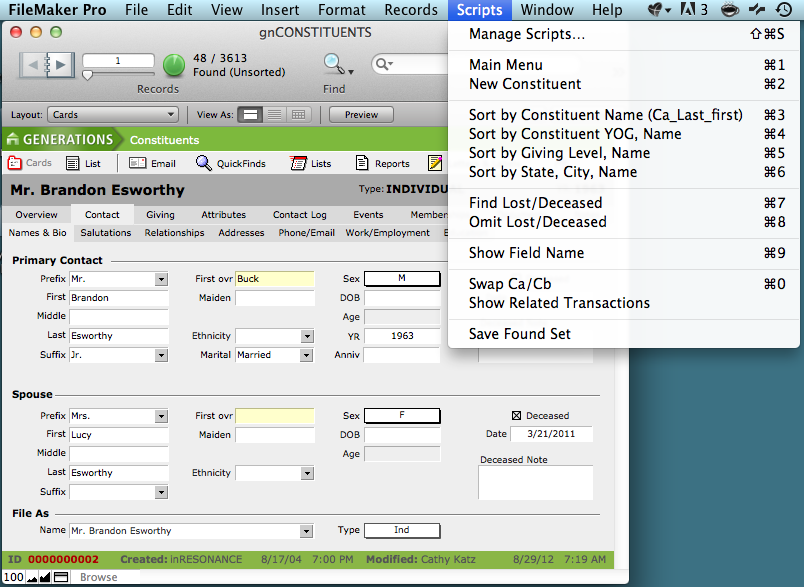
The following scripts are available within the Constituents file:
- Main Menu: Navigates you to the Central Navigation screen
- New Constituent: Add a New Constituent
- Sort by Constituent Name: Sort found set by last name, first name
- Sort by Constituent Year of Graduation (YOG), Name: Sort found set by an alumnus/a’s year of graduation first, then by last name
- Sort by Giving level/Name: Sort found set by giving level first, then last name
- Sort by State, City, Name: Sort found set by state, then city, then last name
- Find Lost/Deceased: Find all constituents who are marked as having a lost address or who are deceased
- Omit Lost/Deceased: Omit all constituents who are marked as having a lost address or who are deceased from your found set
- Show Field name: When your cursor is placed inside a field, this will display the name of that field
- Swap Ca/Cb: A shortcut lets you swap all data attached to Ca (the Primary Constituent) and Cb (the Spouse/Partner), to make the former Cb the new Primary Constituent
- Show Related Transactions: for an individual, or a found set of constituents, this script will bring you all transactions associated with your found set
- Save Found Set: Save a found set of records
