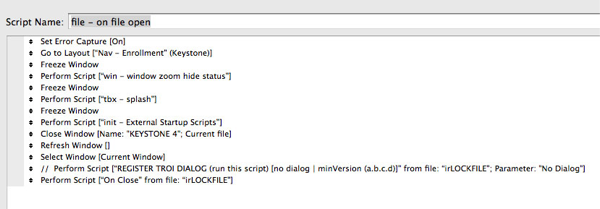
This adjustment will remove the script line that calls for the Troi Dialog plugin which is not needed in FMP 11. This is for KS versions 4.1.4 and earlier.
Follow these steps. Note that instructions immediately precede the screenshots.
- From the KEYSTONE Main Nav Window, Click on Registrations and then click on the Drop/Add button.
- Click on Scripts in the FileMaker menu bar at top of your monitor and then click on Manage Scripts.
- Open the script by double clicking on the script named Commit (Drop/Add|Batch Add|Pending) found near the middle of the scripts.
- Select the 3rd script line and click Specify button in lower right of window.

- In the Set Variable Options window, click on the upper Specify button to the right of Value.

- In the Specify Calculation window, replace the entire contents of the lower large white field with double quotation marks: “” and then click OK in that window and OK in the Set Variables Options window.

- Close the script window. Select Save when prompted.
- Then close ksDROPADD by clicking Done button in upper right of window and select the KEYSTONE Main Nav Window.
- Click on Scripts in the FileMaker menu bar at top of your monitor and then click on Manage Scripts.
- Locate the script named File – on file open and double click on it to open that script.
- Delete the script step that Registers Troi Dialog (see image below – the line is highlighted). Then close the script window by clicking on the left-most radio button in the upper left of the Edit Script window. Select Save when prompted.